
WhatsApp has introduced the Silence Unknown Callers feature to enhance digital security by automatically silencing calls from unknown numbers. The feature is designed to reduce spam calls and lower the risk of fraud and scams.
Feature Automatically Silences Unknown Calls
When Silence Unknown Callers is enabled, calls from numbers not saved in the user’s contacts are automatically silenced, and no notification is delivered. The feature aims to prevent unwanted contact and reduce exposure to fraudulent attempts.




Users can activate the feature by navigating to Settings, selecting Privacy, and enabling Silence Unknown Callers. Once turned on, all calls from unknown numbers will be silenced.
Activation Process in Settings
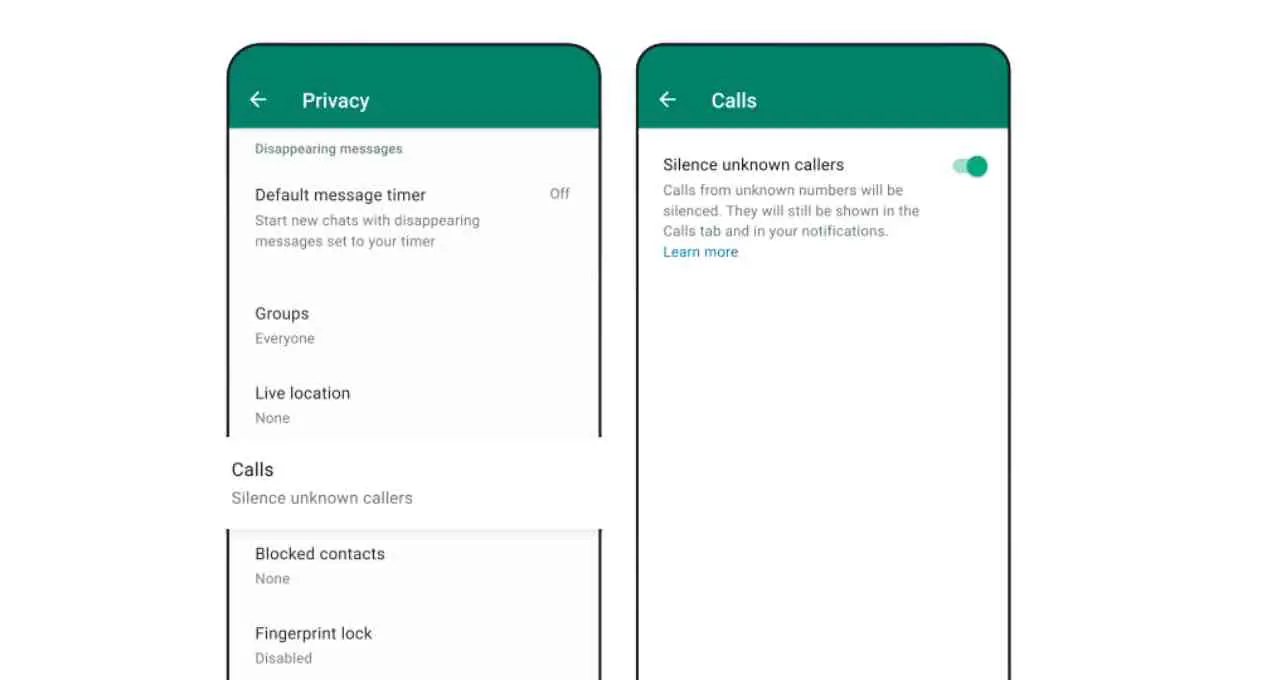
To enable the feature, users must open WhatsApp, tap the three-dot menu at the top right of the screen, and access Settings. Within Settings, they must select Privacy, scroll down to locate Silence Unknown Callers, and switch the option on.
After activation, calls from unknown numbers will not trigger notifications, helping users avoid spam calls.
Digital Security and Privacy Considerations
Cases of spam calls and fraud have been increasing, with several users reporting financial or personal losses linked to calls from unknown numbers. The Silence Unknown Callers feature is intended to address this issue by limiting disruptions from unidentified callers.
According to experts, the feature supports digital security and personal privacy. If an important call is received from an unknown number, users can later respond through a message or by recalling the number.